Remote inspections
A remote inspection is a live video call where you guide the inspector through your site using your mobile device. This allows the inspection to be completed without an on-site visit.
Before the inspection
Requirements
-
Valid mobile number in your Objective Build profile
-
Location services turned on. Build confirms you are at the consented property before starting the call.
-
Working camera on your mobile
-
Fully-charged mobile
-
Stable internet connection
-
Headphones or earphones (recommended for noisy sites)
Prepare the site
-
Ensure good lighting
-
Provide clear access and visibility to all required areas
-
Have any required documents ready to show
Starting the inspection
-
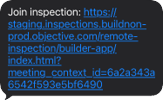
You will receive a text notification with the video call link. Select the link to join the call.
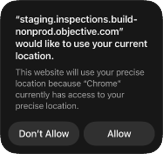
-
Select to Allow the system to use your camera and microphone.
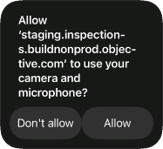
-
Select to Allow the system to use your camera and microphone.
Tip: Call won't connect?
Check your mobile number in Objective Build. Have you enabled location services?
During the inspection
-
Follow the inspector’s directions—ask for clarification if needed
-
Select front or back camera from the menu as required
-
Rotate your phone to landscape for a wider view
-
Walk slowly and hold the device steady
What the inspection does
-
Completes their checklist remotely
-
Takes photos as needed
After the inspection
-
Inspector ends the call
-
Inspection report is finalised
-
You receive confirmation of completion