Profile
Every user of Objective Build has a personal profile where they manage their personal details. Your profile contains key information used to identify you in Objective Build. You can manage some of those details and change your password.
-
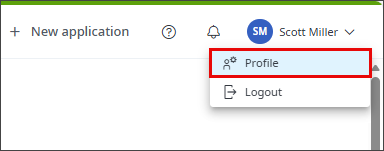
Click your profile
-
Select
 Profile
Update personal details
You can change your first and last name, your contact number and your address. The system uses the information you enter here to set your participant details when you create an application, so it is useful to keep the profile information current for new applications. Modifying your profile information has no effect on your participant details on existing applications. It is used to add the starting contact information at the time you are added as a participant on an application. Modifying your contact information on the participant has no effect on your user profile contact information.
Business name
You can change the business name until you join an organisation, when it is set to the organisation's name and can be changed by the organisation's administrators.
Address
To set your address, start typing in the Address field and select from a list of matching addresses. If your address is not shown, select Can't find the address? Enter it manually to display address fields for you to enter the address. The address set on your profile may be used for mapping travel between your address and another location, for example for you to plan travel to a meeting with a participant on an application or for a building inspector to travel to a property for a planned building consent inspection.
If you cannot match the address, select Can't find the address? Enter it manually and add your address details.
Trade licenses, qualifications and registrations
Add your registration and license information to your profile and these are shown on your participant record on any applications you create.
If you select to add licensed building practitioner license details, you can search the LBP register for your LBP record.
Authority registration
This section is shown if you are registered with one or more building consent authorities for a BCA-specific scheme, such as submission of applications to an independent BCA. The section shows contact details for each BCA with which you are registered.
Change password
You must supply your current password. You cannot undo a password change. If you log out and cannot remember your new password, you must reset your password using a verification code sent to the email address you used to create your account.
Your password must contain at least one uppercase letter, one lowercase letter, one number and one special character. Special characters are:
. [ ] { } ( ) ? "/ \ , > < ' : ; | _ ~ ` = + -