Connections
Objective 3Sixty is a modular content management platform that makes it possible to move, search and perform actions against content in several different repositories from one interface or API.
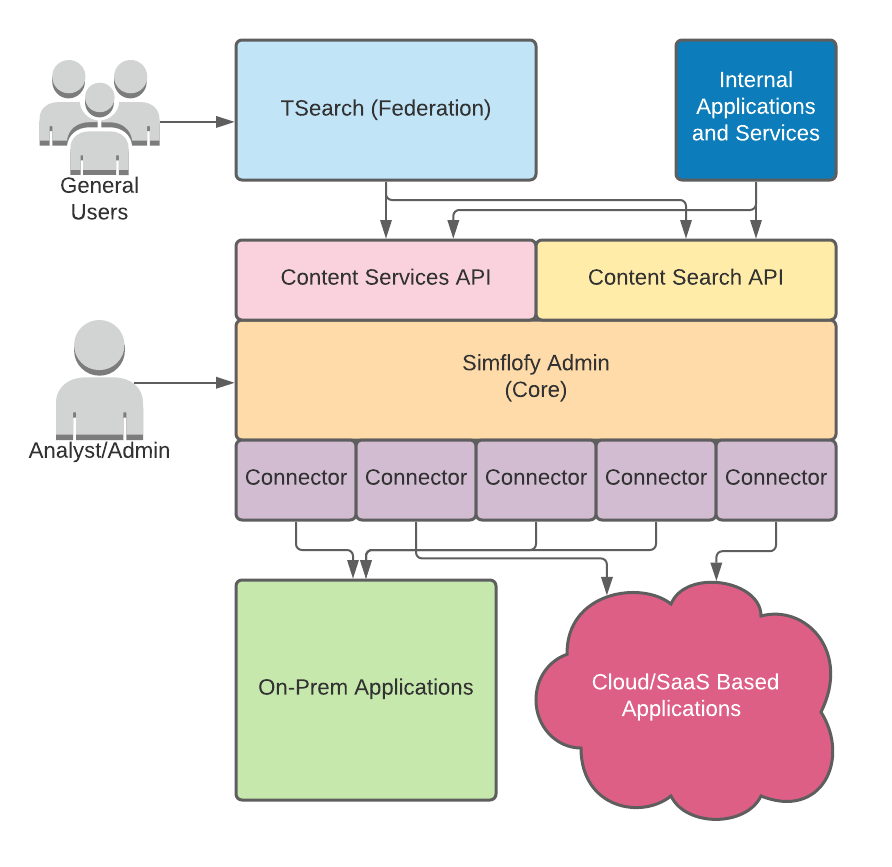
Connectors
Connectors are the first step in the integration process. They represent how Objective 3Sixty connects to other systems. 3Sixty offers the ability to create your own custom connector. See Remote Agent Connection for more detail
Connections are instances of connectors which the user configures.
Objective 3Sixty has connectors for over 50 different ECM tools with the ability to connect to hundreds more using standard connectors like JDBC, CMIS, and FTP.
Authentication connections
Authentication connectors very simply keep the data needed to authenticate against various repositories. These can be used to authenticate integration connectors, content service connectors, and tasks that require authentication.
These are used to authenticate to outside systems and need certain authentication fields like passwords, access tokens or refresh tokens. Authentication is needed for sources such as Google Docs, Office 365, and Salesforce.
See Creating an authentication connection.
Integration connections
Integration connectors are responsible for the heavy lifting of content. These connections retrieve data from the source system and are used to migrate data, index data (for search), or to perform content analysis.
Integration Jobs are used to tie two integration connectors together. With a job we can configure with greater detail what content will be moved and how it will be changes (if at all) as it moves between systems.
Their job is to query or crawl remote systems for files, folders, metadata, versions, and renditions. They also add utilise specific configurations in an integration job through the Specification Tabs during the job creation process. Integrate your Alfresco or FileNet servers for examples of better document management.
See Creating an integration connection.
Discovery
Discovers schemas on the remote system are tables, columns, object types, aspects, categories, content types, index fields, etc. Basically the types and metadata associated for any given system. 3Sixty unifies all of this into a Schema for easier mapping. Discovery makes mapping to and from your sources easier for data migration and ensures the data gets connected to the right fields.
See Schema Instances.
Content service connections
Content service connectors are designed to be stateless and provide a quick method of interacting with a single content item in a pretty expansive way. These connections provide a full ECM API for interacting with files, folders, metadata, versions, and renditions. This includes functionality like check- in/out, upload new files, modify metadata, upload new versions, create folders, redact documents etc.
Think normal ECM actions which include:
-
check in/out
-
property reads and updates
-
download/upload
-
permission changes
With a content service connector you can easily turn any repository into an integral part of a federated content ecosystem.
See Creating a content service connection.
Content search connections
Content search connectors allow you to read an index. These connectors are home to configuration that make sense when supporting search features like syntax highlighting and facets.
Provide a search interface to the Content Services API. These connections implement the 3Sixty search API and query language, both of which mimic Apache Solr.