3Sixty Jobs
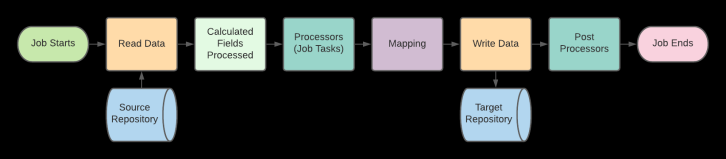
A 3Sixty Job is the process of moving or syncing content (including versions, ACL's, metadata) from one CMS (content management system) to another. Since 3Sixty Jobs are specifically engineered for content management systems, moving content and metadata is just point and click. There are many Job types as well as Job Tasks that can handle anything from data validation and cleansing to duplication detection.
3Sixty Job Flow
Job Types
Users have the option to create different types of jobs, each designed for a different execution model. Options include Simple Migration, Incremental Migration, Manage In Place, Polling, and Event-based jobs. Each type determines how and when processing occurs.
Job Types Overview.
Job Groups
Organise related jobs into logical collections for easier management and oversight. Grouping jobs simplifies monitoring and reporting, and allows administrators to manage scheduling and execution across multiple jobs in a coordinated way rather than configuring each one individually.
More detail on Job Groups
Job Configuration
The Job Configuration section defines how a job is set up and controlled. It includes selecting the job type, specifying source and target systems, and configuring processing rules such as scheduling, filtering, and execution behavior. These settings determine how the job runs and how content is handled during processing.
Job Configuration Details
Action Curated Content
When conducting a federated search in the Discovery UI users can take the results and create a job from them instead of having to rerun separate jobs and reapplying filters. This process is called action curated content. A checkbox has been added to job configuration that allows the user to select if they want the job to be available for curated content. And a widget has been added to discovery that will add an action for the resulting files.
Creating Curated Content
Job Mappings
3Sixty Mapping gives you the ability to map your content types and metadata from one system to another. Before you start, be sure you are familiar with creating jobs and discovery. Both are integral to mapping.
-
Job Mappings Tutorial - This tutorial explains how mapping works including using calculated fields and mapping templates.
-
Mapping Groups - Mapping groups allow you to group job mappings into logical groups that you can then manage together.
-
Properties File Discovery - If you ever have the situation where Discovery can't automatically find your fields, but you know they will be there, then you can create your own mappings with a properties file.
-
3Sixty Expression Language - 3Sixty Expressions are used for calculated fields on the mapping page
Schedule Jobs
Defines when and how often jobs run. Scheduling controls automated execution using configured time intervals or specific run times, ensuring processing occurs consistently without manual intervention. Proper scheduling supports reliable, predictable job operation across environments.
More on Scheduled Jobs
List Jobs
Provides a central view of all configured jobs within the system. It displays key details such as job status, type, and execution history, allowing administrators to monitor activity, review results, and manage jobs from a single location.
More on Job List
Job Tasks
define the individual processing steps within a job. Tasks control how content is handled during execution, including actions such as transforming, filtering, validating, or transferring data. Configuring tasks allows you to tailor the job’s behavior to meet specific migration or synchronization requirements. Click here for the full task list.
Job Tasks Overview
Run and Monitor Jobs
The Run and Monitor Jobs page is where you can monitor the progress of your integration jobs. From this page you can see the status of your jobs. How many files have been migrated. When the job was last ran and any errors that might have occurred during the integration.
Run and Monitor Jobs Overview
Advanced Configurations
PII Detection and Reporting
While doing a document migration or synchronisation it may be prudent to check the document or it's metadata for PII. You can also crawl you content simply for PII by using our reporting output connector with any repository connector that we support.
How to use PII Detection and Reporting
Document Duplication Detection and Reporting
There may be a need to identify duplicate documents in your enterprise and 3Sixty allows you to identify these duplicate documents in a variety of ways.
Identifying Duplicate Documents
Event Configuration
Event Rules let you trigger jobs from content service calls. For example, if a file is updated in a source system, an event can be set up to trigger an index.
Event Job Configurations
Event Job Tutorial
Stuck Jobs
If a job is running and the Abort does not stop the job in an appropriate amount of time, the job can be killed manually through an Admin page.
How to Clear Stuck Jobs
How to View Active Jobs
Related Articles: