Discovery Dashboard
The Discovery Dashboard is the starting point for managing and navigating Discovery views and reports. It provides a centralized view of your content in Discovery, allowing you to quickly find, open, and manage search views, cluster views, and reports. The dashboard helps you stay focused by displaying recently modified items and quick access actions, making it easy to continue your Discovery work.
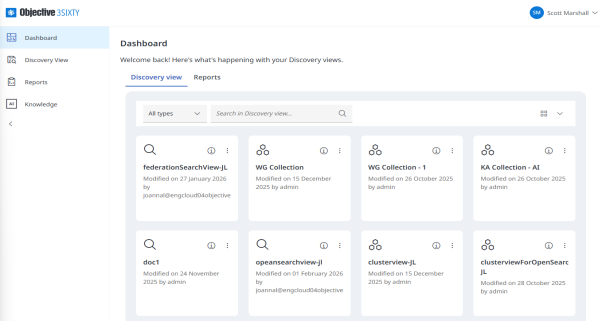
Discovery View
Displays all Discovery views available to you, including search views and cluster views. From this section, you can browse, search, and filter views by type, and open a Discovery view in 3Sixty Admin to explore or manage its configuration.
You can perform the following actions in Discovery View:
-
Filter: Filter the listed views by view type (Search or Cluster).
-
Search: Search for a view by entering keywords.
-
Edit: Opens the Discovery view in 3Sixty Admin so you can make changes.
-
Go to view: Opens the content view to display job results.
-
Delete: Deletes the view. This action cannot be undone.
-
Display: Choose how views are displayed: Large grid or Compact list.
-
Info: Opens the detail summary panel showing information about the view.
Reports
From the Reports tab you can see all of your recent reports at a glance.
You can perform the following actions in Reports:
-
Filter by report type (PII Data Viewer or Discovery Report Viewer)
-
Search for reports by name
-
Change the layout view (Grid or list)
-
Use the info icon to open the detail panel where you can view report details
-
Go to view to view the report results
AI Knowledge
Use the AI driven chat to query your content in a narrative format by selecting the curated view first then entering a question
Related Links
Content Actions
Content Views