Objective Update System Fields
This post processor allows you to update a system field on an ECM document.
This post processor requires a valid ECM Authentication connector to be provided.
Configuration
Auth Connector
Select your ECM Authentication Connector from th drop down.
Condition check
It will execute the task when the condition's result is 'true', 't', 'on', '1', or 'yes' (case-insensitive), or run on all conditions if left empty. This condition is evaluated for each document, determining whether the task should be executed based on the specified values.
Example: If I only want to run this task for PDF documents I would use the expression: equals('#{rd.mimetype}',"application/pdf")
Stop Processing
If the condition results in 'true', 't', 'on', '1', or 'yes' (case-insensitive), no additional tasks will be executed for the current document being processed.
System Field
Use the dropdown menu to select which system field you want to update. Available options include:
- Name
- Description
- Note
Once you've selected a field, enter a value for it. Values can be:
- Plain text, or
- An expression using the 3sixty expression language
After adding a field, you can:
- Delete individual fields using the delete option
- Remove all fields at once using the delete all option
Example
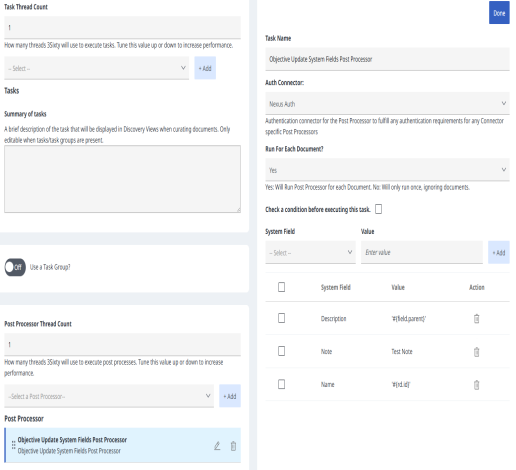
Task Parameters
|
Key |
Display Name |
Type |
|---|---|---|
| use_condition | Check a condition before executing this task. | Boolean |
|
task_condition |
Condition |
String |
|
task_stop_proc |
Stop Processing |
Boolean |
|
param_field_mappings |
System Field and Value |
Json |