Whitelist Locations
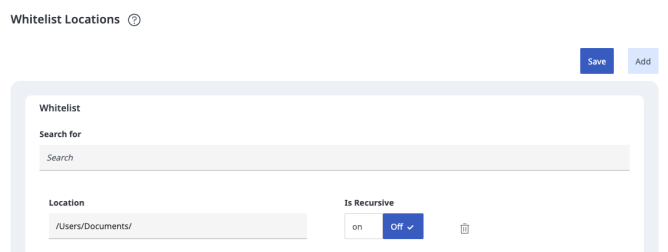
The purpose of the Whitelist location page is to allow admin users to Write documents to the locations they specify. If a location is not included in the page then Jobs/Tasks/Connectors that rely on the filesystem (below) will fail. For security reasons, only Admin users may access this page.
Note: Upon upgrade the affected connectors and tasks will automatically have their configured paths added to the whitelist with is recursive set to off.
Note: Locations in the Objective 3Sixty Apache Tomcat installation or runtime folders, protected operating system folders, or folders linked to these locations cannot be added to the whitelist. Existing whitelist locations that point to protected locations will not be permitted when used by the File System Connector.
A non-comprehensive list of the Jobs/Tasks/Connectors that are affected by this functionality is:
-
MetadataJSONOutputTask
-
FilesystemConnector
-
FilesystemContentServiceConnector
-
BatchParserConnector
-
BFSConnector
-
AlfrescoPoster
-
UnzipFileTask
-
SeparateBinariesTask
Description of UI Elements
Save: Saves the page including deletes
Add: Adds a row to the UI for including a new location to whitelist (Save must be clicked for any changes to be recorded)
Location: The path on the filesystem that 3Sixty will allow Writes. May NOT be a Root path (Such as / for Unix-based systems or C:\ for Windows systems).
Is Recursive: Whether or not the path will allow recursive matches (i.e. whether folders/paths under the listed location will be allowed as well). For example, If you have job A and job B both writing to separate folders in the /Users/Documents folder (such as /Users/Documents/FolderA and /Users/Documents/FolderB) then setting Is Recursive to True (On) will allow both job A and job B to succeed, but having it False then you would need to define two new locations to allow them to run.