Hash Value Generator
Hash values are like fingerprints for files. A cryptographic algorithm processes the contents of a file, producing a unique numerical value, called the hash value, that uniquely identifies the file's contents. Using this task will create a hash value of the document content and include it in the metadata of the file on the repository document. The hash value generator is required when comparing by hash value in the Duplication Check Task to find duplicates.
Note: Note: If you change the contents of the file, the hash value will change since it is based on the contents of the file.
Configuration
To use this task go to the task tab in your job. Select the task from the drop down and click the plus circle to configure the task. Click done after making any changes to save.
Condition check
It will execute the task when the condition's result is 'true', 't', 'on', '1', or 'yes' (case-insensitive), or run on all conditions if left empty. This condition is evaluated for each document, determining whether the task should be executed based on the specified values.
Example: If I only want to run this task for PDF documents I would use the expression: equals('#{rd.mimetype}',"application/pdf")
Algorithm
The type of hash to use. MD5 is the default hash, but SHA hashes are available
-
MD5 (Message Digest Algorithm 5): Generates a 128-bit hash value. It uses a relatively simple algorithm, making it faster but less secure.
-
SHA-1 (Secure Hash Algorithm 1): Generates a 160-bit hash value. It uses a more complex algorithm compared to MD5, providing better security at the time of its creation.
-
SHA-256 (Secure Hash Algorithm 256): Generates a 256-bit hash value and uses a more complex algorithm, providing a significantly higher level of security.
File Size Limit for Hash Generation
3Sixty can generate Hash for any File Size. But users are provided with the option to add File Size limit while generating Hash. If the user does not want to generate a Hash for a file of a particular size, then they can put it in megabytes.
-
Do not generate hash for file size exceeding this size limit: Enter the file size in megabytes for which you would like to limit 3Sixty in generating hash values.
Action: In this drop down you will let 3Sixty know what to do when it encounters a file that is larger than the limitation size.
-
Audit and Continue: 3Sixty will make note of the file in the Audit logs and proceed with the transfer
-
Skip: 3Sixty will skip the file that exceeds the limit
-
Fail: 3Sixty will stop the job if it encounters a file that exceeds the limit
-
Field to Hash
3Sixty can automatically detect duplicate documents across all folders in the repository using the File Hash field in Duplicate Detection task for comparison. You have the option to enter metadata on the Hash Value Generator task, to maintain an organized and optimized document collection by avoiding redundant content.
-
Binary: This is the default value and if selected no further fields are needed.
-
Metadata: Enter values in:
-
Metadata field: Specify which metadata field you want the hash to be based on (for example, Extension, Content, Author).
-
Output field: Define where the generated hash for this task will be stored. Ensure that the field name entered here matches the field name provided in the Metadata Field for the Duplicate Detection task to ensure compatibility and accurate duplicate detection.
-
Examples
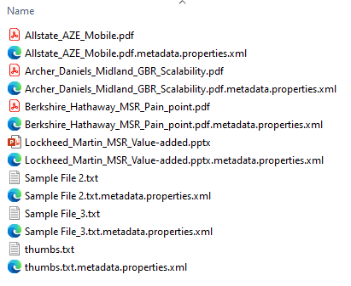
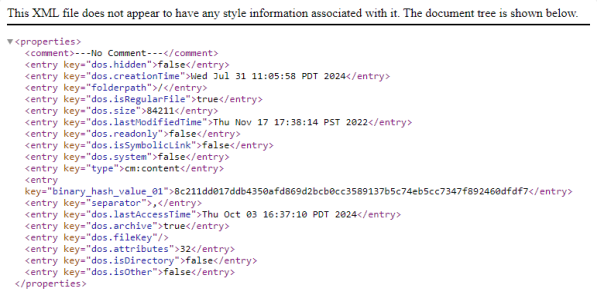
To view the hash value that has been generated you can create a bfs job. This will generate an xml document giving you the metadata for each file. Here you will see the binary_hash_value_01 field. See the images below.
API Keys
Processor: hashValueGeneratorTask
|
Key |
Display Name |
Type |
|---|---|---|
| use_condition | Check a condition before executing this task. | Boolean |
|
task_condition |
Condition |
String |
|
task_stop_proc |
Stop Processing |
Boolean |
|
hash_algorithm |
Algorithm |
String |
|
file_limit |
File Size Limit for Hash Generation |
Boolean |
|
file_size |
Do not generate hash for file size exceeding this size limit (megabyte) |
INTEGER |
|
action |
Action |
String |