Attach Content - S3
Attaches a binary to the repository document from an S3 bucket.
Configuration
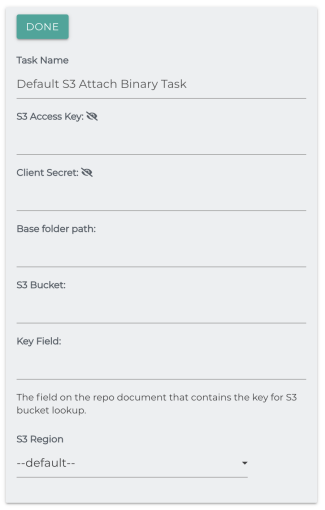
To use this task go to the task tab in your job. Select the task from the drop down and click the plus circle to configure the task. Click done after making any changes to save.
S3 Access Key
The access key for your S3 connection.
Client Secret
The client secret for your S3 connection.
Base Folder Path
A base path to be prepended to your key.
S3 Bucket
The bucket to search for the binary. Also, list items either all have periods or none of them do.
Key Field
The field on the repo document that contains the key for S3 bucket lookup.
Examples
API Keys
Processor: attachS3ContentTask
|
Key |
Display Name |
Type |
|---|---|---|
| use_condition | Check a condition before executing this task. | Boolean |
|
task_condition |
Condition |
String |
|
task_stop_proc |
Stop Processing |
Boolean |
|
auth_con_field |
Select an Authentication Connector |
String |
|
ac_aws_base_path |
Base folder path: |
String |
|
ac_aws_bucket_name |
S3 Bucket: |
String |
|
ac_sim_key_field |
Key Field: |
String |